“Is there a way I can delete pages I’ve created on Facebook?”

Here’s how to delete Facebook pages:
1. Log into your Facebook account.
2. Head over to the page you want to permanently remove.
3. Now that you are on the page, click on ‘Edit Page’ located near the top of the page.

4. Click on ‘Manage Permissions’ from the drop-down menu.
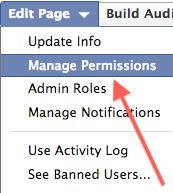
5. Scroll down near the bottom of the page, click on ‘Delete (your page name goes here)’.

6. A dialog box will appear, confirm the deletion by clicking ‘Delete’.
THANK YOU !!!!!!!
How about actually deleting one you created?
Nice thanks.
cheeeeeeeeers
You are wrong, wrong, wrong! You CANNOT delete the pages. There is NOTHING to click at the end or tope of the pages. FACEBOOK is ignoring this or the developers are too lazy/stupid.
To eliminate a page you created you have to search for the name of the page in the search bar, open it, then click “Edit Page” and then “Delete page”. I did it and it works.
if you are the admin of the page then you have to remove your self from fans so the delete link will actually works…. cheers
F–K Facebook I can’t get on the computer because of this Facebook. My Sister is always playing Poker in there. Please delete Facebook.
Thanks
Thank you very much
Thanks 🙂
THANKS A LOOOOT
FORGOT A STEP****
Once you get to the fan page you must click info!
how do I delete a fan from my fan facebook page?
Wtf, How I delete one pages which fan I are? Okay I click Profile but where is next thing “My pages”?
@fava
youre an idiot, its right there at the bottom of the left column, jesus christ look before you come on here and complain dumbass
@mr. evo
not that hard dude, Profile –> Info –> Scroll down to pages –> click on page –> scroll to bottom of left column –> click “remove me from fans”
It’s work wD me thaaaaaaaaaanX 4 Dt
Thanks a lot
Thanks a lot!!!
How about deleting mutual? like me, i ended up becoming af fan of all these stupid things and doesn’t want to be anymore. do i have to do it like the descripition, or is there an easier way.
thanks a lot, I did remove a page from fun pages, it worked.
🙂
Thanks so much. Perfect step by step instructions that actually complete the task!!
Thank you! Worked perfectly.
Thank you 🙂
please cancel the Facebook that I just signed up for. It is not at all what I thought it would be. Thank You Janiece Adams
Still no easy links for deleting from FB. If I “share” anything it post straight to the FB search of my name. There are pic’s I want to take off of there and I have already changed all of my settings, Now what do I do?
thanks i have removed the unwanted page
This works, but there isn’t an easier way to remove yourself as fan from a page is there? *I have a lot and having to remove each page on the page url really takes long*
THANK YOUUUUUUUUUUUUUUUUUUUUU !!!!!!!!!!! u have no idea
thx! 🙂
Thank you guy!
This is concerning PEOPLE, not FAN pages. Can you tell me how to eliminate a duplicate Nancy Gershman page I have on Facebook?
THANKS SOOOO MUCH!
you literally saved my life 😀
who ever you are, where ever u- I LY 😉
p.s no that anyone cares but i have got a party to go to tonight and im just a little over excited- lol, so im a little hihg, isnt everyone? ;D
have a happy new year and christmas everyonee 🙂 woot woot!
Thank You….!!
this didn’t help im a fan of over 1300 things and that will take wayyyyy tooo longgggg
GREAT! THANK YOU SOOOO MUCH!
thank you… I thought i cannot delete it… whew
What about when a fan page shows up in your search, but you go to click it, and it brings you back to your homepage? How do you delete those?
is there a way to delete all the fans at once?!?!?!
thanks. very useful
I have a friend who sends me lots of pictures that I do not want
or need. How do I get rid of all those pictures on facebook. They
are from a friend who sends these photos to me when I could see
them on his facebook page.
Please help me!!.
thx…
Cheers!!!!
THANKS!!
Thank-you!!!!!!
they didn’t “literally” save your life, Sasha. Your life didn’t depend on it.
I hate when people purposely say “literally” and it they don’t mean it.
Anyway, it appears that it shows on my profile all 434 O.o pages i’ve become a fan of, purely because they’ve shown up on my main page.
Does anyone have any idea how i can either get it to be hidden from my profile or delete them all at once rather than just visit every page and individually scroll to the bottom and “Remove me from fans”?
Thanks.
to delete a “page” click on the icon or link of the page you want to delete. this is provided in your “info” tab, under the “pages” section. (this will take you to a different facebook page.) keep your eye to the left of the page (underneath the picture and friends, etc.) you should find a link that says “remove me from fans”. click it. this will delete the unwanted “page”. 🙂
thank you, you are awesome!
thanksssss alot
Thank you……………..So Much for the Easy, Clear way to preform this……………whew.
ohhhh finally thank you
how to delete fan pages o facebook go to my friends.. pages.. click the x next to the one you want to delete.. then hit delete
thanks sooo much!!! that really works! THANKYOU!! 🙂
it worked out for me thanks
its simple
i can see the link that say remove me from fun pages…where i can find it…
and no fun pages here it only say pages…..pls tell me the truth
THAT IS REALLY HARD, wat abt if i forgot the name? if i remember i would rather rite in the seaarch place, much easier
THANK YOU SO MUCH!!!
Why is the pages are of the info tab so unorganized and scattered?
Is there any way to sort it or make it a big blue block or words (like the groups area)?
Thanks in advance.
that works but i have 2,316 fan pages and i’m not allowed to add any more pages or friends till i delete them and i want to delete all of them is there a way to do that?
Great now I have to do that 691 more times. FML
yup
it’s work!
thanks a lot
Thanks! I accidentally clicked something I would NOT become a fan of, lol.
thanx a lot.
OMG THANK YOU!!
they make it so damn obscure.
Thanks mate, this one’s been bugging me me for some time.
thanks, its working..
click ‘account’ -> edit friends
click ‘pages’ on the left hand side
click the X next to the page you want to delete
done.
Thank you so much! Wish it didn’t required instructions…
mine doesn’t have X beside of the Pages wtf I can’t delete, does any one have same problem.
JB, Your advice helped more then the original advice.
Plus it was shorter. THX
Thank You soo muchh
Another way to delete a page from you list of pages is:
right click on the “see all” link on your friend list on left pan of your profile page, and open in new tab or new window. Click the “X” sign in front of the pages you want to delete.
Each page you add appears in your friend list as well.
THANKS
Hello. I understand what you guys are dong but is there anyway you can delete all of ur pages at once?.. plzz answer
If I made the fan page how do I make it go away?
Another way to remove the page it’s really easy
To remove a Page from your “Favorite Pages” section, you will first need to view the Page you’d like to remove from this section. Then, click on the “Remove from my Page’s Favorites” link found at the bottom of the Page.
how do I remove a page from a CNN video I clicked to recommend . Since it’s not a fan page I do not see a way of removing it off my pages list. help?
Thank you very much it really worked…
Agreed with above, how do I remove a page from a CNN video I clicked to recommend . Since it’s not a fan page I do not see a way of removing it off my pages list. PLEASE HELP.
there should be an eaiser way..
If you want to do it faster you can go to your profile and then go to the info tabs and then click edit on the likes and interests tab and then scroll to the bottom and click show more pages and there you can just delete them all quickly
Thanks! stupid adverts
طيب انا عندي صفح لي في الفيس بوك وش لون خذف؟؟؟؟
Thank you.
this sucks. ha, i’m a fan over over 2,000 pages.
Oh mah god, thanks. Oh mah god. Woah!!
how can i remove my own created page … without del my face book id
Thank you, Thank you, Thank you!
Felt so good to delete that page!
Thx
how can i remove a like page from my Likes list? I tried the edit list but for some reason it doesnt appear there, its only on the likes list on front page (and when i click it automatically opens their internet page, not the facebook page). The page is I CAN SEE YOU….its driving me crazy! Any advice?
Thanks a bunch. Really helped me get rid of an irritating page…:-)
Same as Kuka, I also can’t remove the “I can see you” page, because it is not shown in the list of pages. Although it is shown at “my favorites”…..
On their page is no button to “dislike” and facebook gives a warning-page when you click on it.
I want to get rid of this page ;-p
Thank you soooo much !!!
Same as Kuka and Patricia. I’ve tried everything. This was a “like” on someone’s post. It’s now listed on my “likes”. I don’t click on these kinds of things, but for some reason did on this one. I only have two items under my “like list” (this stupid thing is one of them) and the other is for a personal one for a deceased family member. I can’t get this thing off my profile page. Help!
When I go onto my “account” and click
“Edit Friends” and many say in the top left corner-ish
it’ll say “Pages”..
When I got there I can not find “Pages” anywhere!
any ideas..
And no I dont need glasses.
How can i remove a like page from my Likes list? I tried using edit but it didn’t work. Please help!
Expert said it best on May 11, 2010. “Pages” wasn’t showing up in the left hand column for me. If you want to do it faster you can go to your profile and then go to the info tabs and then click edit on the likes and interests tab and then scroll to the bottom and click show more pages and there you can just delete them all quickly
I have the same problem as Destiny…it doesn’t appear the “Pages” option on the Edit friends section. Some help please….
I DON’T have a “page” link on the left hand side, what now?
i think they changed fb, now i cant figure how to delete some, and i have over 5,000 and it wont let me add anymore friends or anythnig until i delete some first.
the only way that works is go to your profile and click info tab, click view other pages at the bottom of the page. and you will be able to remove any page you want!!!
or try going to:
http://www.facebook.com/friends/edit/#!/editprofile.php?sk=interests
That didnt’ work. This is the answer from Facebook Help Center:
* How do I edit the “Likes and Interests” field on my profile?
To edit your “Likes and Interests” field, first click “Edit My Profile” underneath your profile picture. Then, select “Likes and Interests” from the left column menu.
To add items, just begin typing them into the appropriate field and select one of the suggestions in the drop-down that appears. To reorganize how items will appear on your profile, you can drag and drop them as you please. To delete an item, you’ll need to go directly to the item’s Page and click the “Unlike” link in the lower left-hand column of the Page.
This tells me to drop down my account and click on applications settings but let me tell you there is no applications settings on my account drop down!!!! HELP I need to rid of my games I do not play so that I will not have trouble playing the other games. Again HELP what so I do?????
iHOPE THiS WORKSS !! .
On the Home page below profile picture, click on the line “Edit My Profile’. On the next page in the right side of the page there are six different information can be updated and one of them is ‘Like & Interest’. Click on that. On the next page above save changes, there is link show other pages. Click on that and it will show all the interest and likes. Unwanted interests/likings can be removed from there.
it says i have 24 likes when i only have 2, what might be the problem?
what I finally found out was to go to my wall where it says I “like” something as one of my posts. there is a cross at the right hand top corner when you put your cursor on it and when you click there are options such as “remove like”
Does anyone know if there is a way to rearrange your likes on facebook, the ones in the other category not interests, activities, music and movies because I know how to use the drag and drop method for those when editing, but would like to catergorize all other likes in the other section.
I can’t see the page in there only see the
Friends phone book find friends and innvite friends how can i delete a page
take a look here:
http://www.facebook.com/help/?faq=15197&tq
Very simple:
1. Go to Account and drop down to Manage Pages
2. Hit Go To Page
3. Under the profile picture select Edit Page
4. Select on top, Manage Permissions
5. Select Permanently delete this Page
Voila! Your page is deleted.
If you find this information useful please “like” us on facebook at:
http://www.facebook.com/OfficialKingIce
Thank you.
Hi,
I follow these steps to delete a business Fan Page and the FB system says’ You can not delete this page” I was logged in as ADMIN….help!
Have the same problem, FB says I can not delete this page although I’m the admin (the only one).
Yes, having same problem can not delete a page i am the only admin on
http://www.facebook.com/pages/PAGE-Ni-PaUL-%C3%9C/124124050996075
LIKE THIS PAGE.. TNX
Facebook is too dangerous ! Every things you wanna do is difficult ! they wants to keep everything about you !
thanks but it is not working because there in not any page link on the right side of the to remove the pages from my facebook account.
kumamae z wat unataka nn?
How do I delete fb pages on an iPhone 4 fb app?
How do I delete that STUPID “Welcome” page that shows up whenever I logon to Facebook… and prompts me to Search For Friends… etc… I already did that and don’t want to be prompted every time I login to Facebook…
http://www.facebook.com/help/like
How do I unlike something?
You can unlike a piece of content or a Page on Facebook.
■
To unlike a piece of content that you or a friend has posted, just click the Unlike link that appears beneath the content itself.
■
To unlike a Page (which will also remove it from your profile/timeline), go directly to the Page and click the Unlike link in the lower left-hand column.
How do I delete fb pages from my iPhone 4 on fb app!?
So I’ve just done that but it seems that every informations about me will remain in their computers !
Does anybody know how to definitely delete everything about me on facebook ?
thanks !
Esther Max May 22, 2011 at 4:01 pm
There is an easy way to un-Like a page on facebook…
A facebook App that will show you ALL of your LIKE’s
http://apps.facebook.com/mylikesbox
– You can easily select which Page to unLike
Enjoy:-)
thank u so much maxmay , it’s work
i need to delete my facebook page
“cliff October 1, 2011 at 11:15 am
How do I delete that STUPID “Welcome” page that shows up whenever I logon to Facebook… and prompts me to Search For Friends… etc… I already did that and don’t want to be prompted every time I login to Facebook…”
Yes, I agree IT IS A STUPID WELCOME PAGE. My issue is that the welcome page they are forcing on my FB is the Bubble Speed! I hate this game now. I used to like it and I did removed and then reported it as a spam but my welcome page still BS (Bubble Speed) even if I removed it already… very bad of them forcing their game as my welcome page. They lost me as their gamer -to bad for them… bad business practice for this company?!! …Grrr!
Hi,
You can search for the page you want to remove. Once you locate it, you can see a “Message” tab with a drop down arrow. You can unlike it and the page disappears from your profile.
Good Luck!
hi,
thanks lavanya its working fine.
Finally figured this out, if you like me are annoyed by those AD spamers behind those FB pages, here’s how to remove it (shame on FB deliberately made it hard to find the right place to remove them)
1: Logon your FB account
2: Scroll all the way down till you see “About . Advertising . Create a Pages ….”, they are grayed out and small, so look carefully.
3: Click on ” Create a Page”
4: look at upper right, click on”Pages I Like”
5: There you will see all the pages, to right there are “liked” buttons, just hover you mouse button over the “liked” button, a small popup will shows up, you can then click on”unlike” to remove any page you want to get rid of.
* it may take a while for the popup to comes out, or try to click on the “liked” bottom.
thank you for your nice posting about facebook like fan page.hello dear please tell me how can i change my facebook fan page.
how do u delete a liked page if u created it ????
~~~~~~~~~~100% sure This will works ~~~~~~~~~~~
First open ur page
and start using as that page ……
and then there will B settings symbol
In it go to ” Manage Permissions”
Open Manage Permissions
At lastttttttt
Above the “SAVE CHANGES” button there will B one option ” ” “DELETE PAGE ” that’s It
Thanx a lot BOSS!!
its perfectly works
Thank’s its works …:-)
Thank you for your help info of how to delete FB pages. I had been puzzled by this problem before landing on this side. Your guide is clear and effective. My FB problem has been over because of your info help.
thanks this answer was helpful
thanks…. for this answer..:)
hi thanks for the help i reallu needed it
thanks i totally needed that info
I have been trying to delete the page from last 2 days but didnt found the button ..thanks .
For some reason the option of ‘Manage Permissions’ isn’t on my page… and I created it… I don’t know what to do. I deleted everything off of the page but I would like it gone. Ugh.. I have been trying to figure this out for weeks now.
THANK U ……
thanks it really helped me
thanks buddy it works
thanks
not showing manage permission option???
please help delete my fb page……………….
thanx admin.. 😉
How can i delete my page on fb using tablet or android?
thanks! it worked! 😀
thanks
Thanks a lot,
I mistakely made a page and don’t know how to delete
How i delete like page in my old facebook account
I’m not being able to find any edit page option on my fb page. Pls help
Thanks!
I am IT manager from A. Menarini India, I want to delete my company page which is created by unknown person, how do I do this.
https://www.facebook.com/pages/AMenarini-India-Private-Limited/644842672196030
please help its urgent.
thanks,
nitin p