“I shot some cool videos from my iPhone 3GS but I can’t figure out how to upload it to YouTube from my phone. I’m pretty sure there’s a way to do this but I just haven’t found that magical “upload to YouTube” button.”
First thing you’ll need is a YouTube account. Don’t have one? That can me solved by signing up for one here. Make it easy on yourself and do this on the computer and not your iPhone.
Alright lets get to the meat of this tutorial on uploading iPhone videos to Youtube:
View your iPhone video by going to the Photo gallery and in Camera roll.
Click on the little box with an arrow sticking out in the left hand corner.

You should now get the option to “Email video” and “Send to Youtube”, click on the “Send to Youtube” button.
Log into your Youtube account and tap “Sign in”.
Enter the Title, then a quick description, tags, and then choose a Category for your video. When you’re finished with all the description stuff, press the “Publish” button on the top right hand side.
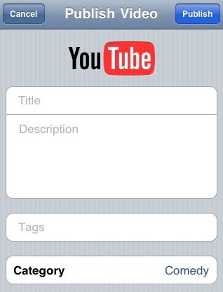
The iPhone video will now upload to YouTube, give it a few minutes until you see a dialogue box that comes up giving you the option to “View on Youtube” or “Tell a friend”. Enjoy!
I’ve been uploading videos to YouTube fine…until this morning. For the past 5 hours when I try to upload, while I’m typing in the description, tags, etc., I get a pop up that says “YouTube not available. Any idea what’s going on?
I was using this very helpful info-THANK YOU! and realized that the phone was following my email account to a particular youTube account. How can I point it to another account I own?
Thank you!
Video Uploader for Facebook
Quickly Upload Videos and Photos to Facebook directly from iPhone. Capture the perfect moments on your iPhone’s camera and instantly share with your friends on Facebook. Geotag your photos.
Download Now: http://itunes.apple.com/us/app/video-photo-uploader-for-social/id349427597?mt=8
Hey,
You can use the Free KinKast App to upload videos to Facebook or YouTube or share videos of unlimited length privately with friends http://bit.ly/ecRHtf
When i do this yeah, when i sign into my fucking account after clicking the send to youtube button, i always enter my username and password correct, and it just keeps coming back telling me to enter it again, so basically it wont accept my username and password, but i have another account, and it accepts it for that one, but why not the other one?
EVERY TIME I TRY TO POST A VIDEO TO YOUTUBE IT SAYS IT CAN NOT PUBLISH VIDEO. WHAT CAN I DO?
I don’t unremarkably comment but I gotta state regards for the post on this perfect one : D.
hey thanx, help me a lot 🙂 make me fall in love with my iPhone 4 again and again ^o^
omg thanks !!!i can finally post my videos on youtube by the iphone.
Thanx so much for this!! But i was wondering how to change the upload location. Like it tells me its going to upload to “this accout” and i cant find how to switch accounts. Any ideas?
every time I try to upload a video it says the username and password failed….even though I can easily log into youtube from my iphone via the youtube app and page/
what’s wrong?
Does this use data from my data plan? Cause I plan on uploading often but do not want to go over my data plan.
I’d also like to switch accounts like Ally. I have more than one YouTube account, but it seems like I can only upload to the first account that I logged in with and there’s no way of switching. Any ideas? Thank you!
trying to upload vidoe to youtube with ipod touch.I enter user name and password but it keeps coming up.what am i doing wrong
I Made A New Channel And Now I Do Send To Youtube And It Sends To My Old Youtube How Can I Change It
it is saying i need a tag….was is a tag??????/
I have a 3 minute video I would like to post on youtube that is currently on my iPhone. It is too long to send via e-mail to anyone, so I am being told!! Then youtube came into play but I needed a UN and PW. So, I went to the youtube site and ‘signed up.’ Having created this new e-address above. However, when now try to send my 3 minute video to youtube I am told that youtube cannot ‘authenticate’ my UN and PW. WHAT am I doing incorrectly???
Thank you. Pauline
i just published a video from my iphone,, but cant find it in you tube? what could be the problem?
I’m attempting to upload a couple of 6-7 minute videos to youtube from my I-Phone, but the I-phone simply tells me “Could not post to you tube, after going through all of the steps it takes to post. It looks like I’m getting somewhere, and then the progress bar just stops and it says, could not post to youtube.
every time I try to upload a video it says the username and password failed….even though I can easily log into youtube from my iphone via the youtube app and page/
what’s wrong?
I have the same problem every time I try to upload a video my phone says “cannot publish to YouTube” what is wrong?
Well…I’ve done all of the above and when it finishes loading it says unable to post to youtube. I have no idea why it won’t load onto Youtube, but I’ve tried 2 videos now, with the same result. grrrrr…..help!!! I have an IPhone 4.
My iPhone 4S says the same cannot post to utube please help
for sum reason wen I try to upload a video to youtube it alwaiiz sai dat I hve to put in mii youtube password in bt wen I do put it in correctly it alwaiiz sai dat its authentication failed nd dat the username or password I entered is incorrect nd im sick of it keep doin dat………..so wat do i do for it to work nd dat stuff to stop poppin up?
Thank you so very much! 🙂
If it’s a video a little youtube should show up and click it give it a title and a discription.