I would like to block certain websites on my computer whats a good and hopefully free way to block websites?
One of the easiest and free way to block access to a website is modifying the Windows “Host” file. It’s not very hard to do and will only take a few minutes. This will work on Windows XP, Windows Vista and older Windows OS
.
When you use the host file to block a website it will work with all browsers and all User Accounts.
*Vista users must disable UAC and have Administrative rights before modifying the hosts file.
Click Start > Computer > Local Disk (C:) > Windows > System 32 > drivers > etc.
Now open the “hosts” file with Notepad (you can do that by right clicking on the file and choose “Open” then select Notepad)
This is where you can add websites that you want to block. Under the section “127.0.0.1 Localhost” is where you type in the website to block. All you have to do is type “127.0.0.1 url to block” in the next line after all the default local hosts text.
Here’s a quick example lets say I want to block “Myspace” from being accessed from this computer all I would do is add “127.0.0.1 www.myspace.com”. Its also a good idea to add another line without the “www” but this step may not be necessary, test and try.
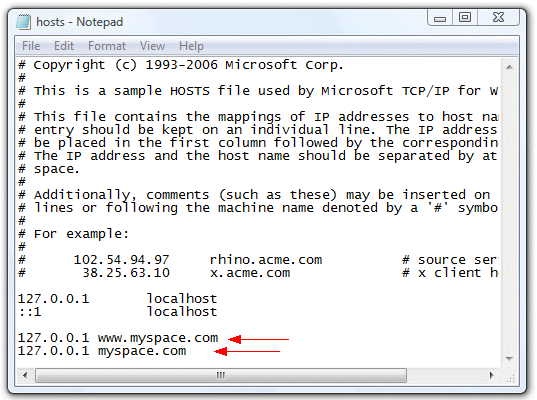
When you are finished adding all the site you want to block be sure to save it. Now try to accessing the site you are trying to block. You should see a “Unable to connect” web page. If it didn’t work try restarting the computer.
You can add as many sites to block as you like and you can also block certain pages from being accessed as well.
Hi! I’m trying to block a site and have followed the above instructions yet I get an error message when I go to Save in notepad. This is the message I get:
Cannot create the C:\WINDOWS\system32\drivers\etc\hosts file
What do I do??
Someone pls let me know: icon_boiii@yahoo.ca
Thanx!! 🙂
I want to block a website using our residental gateway so no one on the home network can access. I want to be able to do this by signing into the router from my desktop, accessing with password, and daughter never being the wiser. Any suggestions?
Some routers will have a feature which will allow you to block sites, check your router manual to see if it has this feature. Another way to block sites with the router is to switch you default DNS with OpenDNS http://www.opendns.com/. There are lots instructions on how to install this on many different types of router. After you have successfully installed OpenDNS on your router you can log into the Administration panel and enter websites you wish to block. This will block the website on your whole network.
I want to block certain sites for certain users. I have 6 users on my computer and I only want to block 2 of them from certain online content. What can I do? Thanks in advance…
I want to block certain sites for certain users. I have 6 users on my computer and I only want to block 1 of them from certain online content. What can I do?
how do we unblock it?
I just want to comment on the assertion that “Vista users must disable UAC and have Administrative rights before modifying the hosts file.” That’s only half true. The task can be accomplished just as easily by running Notepad or whatever text editor you want to use with elevated privileges. In terms of best practices, you probably shouldn’t be telling people to disable UAC. At the very least, you should tell them to re-enable it after disabling it. I know UAC isn’t popular, but it does serve a purpose.
why is this step does’nt block some of the websites.. like youporn nd other pornographic website?
Are the websites blocked by this method can’t be opened through online proxy servers????
How to block tagged site in my computer?
how to block the pornographic websites??
How do you unblock it?
Even though I’m the administrator on this computer, its still giving me an error message telling me to contact the administrator.
On start-up, press F8 & then go into Safe Mode. Then you can edit the host file & save without any probs.
Enjoy
1.Go to your HOSTS file which is located at:
C:\WINDOWS\SYSTEM32\DRIVERS\ETC for windows Vista/windows 7 and XP
Type an entry about a website you want to block.
The entry must have two parts: an IP address and the address of the website you want to block. Choose 127.0.0.1 as an IP address, leave a space and then type the address of the rogue website. Here’s an example:
127.0.0.1 http://www.facebook.com.
# Copyright (c) 1993-1999 Microsoft Corp.
#
# This is a sample HOSTS file used by Microsoft TCP/IP for Windows.
#
# This file contains the mappings of IP addresses to host names. Each…# entry should be kept on an individual line. The IP address should.
# be placed in the first column followed by the corresponding host name.
# The IP address and the host name should be separated by at least one.
# space.
#
# Additionally, comments (such as these) may be inserted on individual.
# lines or following the machine name denoted by a ‘#’ symbol.
#
# For example:
#
# 102.54.94.97 rhino.acme.com # source server.
# 38.25.63.10 x.acme.com # x client host.
127.0.0.1 localhost.
127.0.0.1 http://www.facebook.com.
127.0.0.1 http://www.youtube.com.
Extra step: Windows XP/2000 only
In XP and 2000, the DNS Client (a system service), will make your machine come to a grinding hault if your HOSTS file is too large. This service is unnecessary and can be stopped and disabled. Go to Start > Run > enter “services.msc” then hit [Enter]
Navigate to DNS Client, right-click it, select Properties, under Start-up Type, select Manual. Click Apply. Then below that, click the Stop button. You should do this before you save a large list of servers to your HOSTS file.
Disabling/Enabling the HOSTS blocking
If you ever need to disable the blocking, just rename the hosts file to anything. I usually rename it to hosts.disable. After you do that, you need to restart your browser to see the changes. To enable it again, just rename it back to hosts.
You could also write a script to do this for you. An example called disable.bat:
cd C:\WINDOWS\system32\drivers\etc && ren hosts hosts.disable
And another example called enable.bat:
cd C:\WINDOWS\system32\drivers\etc && ren hosts.disable hosts
enjoy people… 😉
using the host file to block the site, it works nicely 10Q ,but how can I block some sites with time duration any help. 10Q in Advance.
I want to block certain one game in facebook. I only want to block that specific game. It that possible. If Yes, What can I do?
I want to restrict facebook on my PC. I am trying to Block it using ‘Content Advisor’ and ‘system32/drivers/hosts’ both of them not working. Tell me more ideas behind it. When i am trying to using ‘content advisor’ all of the websites locked. and using ‘Hosts’ it will not to be saved, asking save the file to any other location. even i tried it to copy paste from that location. not working. kindly tell me the code behind.
I have followed these instructions to the letter, and am still able to access the site/s that I wish to block.
It’s just a tad frustrating that many people have asked questions and there are very few replies to those. 🙁
It is not present in Windows 8 but by making
few changes you can replicate aero glass affect to a certain extent.
Place a little more details fot it, and you have
a porcelain tile. If your demand to Windows 8 security is not too
high, Windows Defender can totally satisfy you.