“Whats the easiest way to delete or remove a song from an iPod Touch?”
Unfortunately there is no way to delete songs from the iPod touch itself. To delete songs from your iPod touch you will need to do it through iTunes. If you don’t have iTunes yet you can download if from for free from Apple at http://www.apple.com/itunes/download/.
Note: To delete songs off your iPod touch or any other iPods you will need to set your iTunes settings to “Manual” mode. You can do that in iTunes by clicking your iPod under “Devices” on the left hand side and under the Summary tab make sure “Manually manage music and videos” is checked.
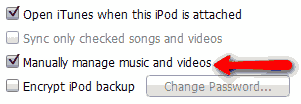
Open iTunes and plug in your iPod touch.
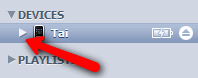
Under “Devices” click on the iPod touch icon. Then click the side ways triangle beside your iPod touch icon.
You can now see a list of different media categories such as Music, Movies, TV Shows, Podcasts, and more. We want to delete songs from the iPod touch so select “Music” from the menu by clicking on it.
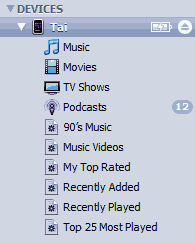
All your songs will be listed in the main content area. Click on the song you want to delete from your iPod touch and press the “Delete” key on your keyboard or “right click” on the song and scroll down to “Delete” to remove the song. To select multiple songs at once, hold down the “Ctrl” and click on each song. To select multiple songs in a row click on the first song to delete and hold down the “Shift” key and select the last song.
This method will only remove songs from your iPod and not your iTunes library.
Hi.
I followed what you said about my ipod touch and itunes, but for some reason it didnt work. I mean, the music list would come up but they were gray looking (You know when you cant click a button it is showed as gray so you know) so I clicked it anyways and clicked “delete” on my computer but it still didnt work. My brother is a newby with ipods too and he told me to delete the songs from my itunes library but the way i synked my ipod was so that i had to chose individual songs and playlists. please help me
Hey!
I wanted to say thank you and that I found out what I was doing wrong. I didn’t have it on manually manage songs. I totally looked over that. Thank you again you were a big help and reduced a lot of stress on my part! thank you!
Glad this post helped, Kayla. Enjoy the iPod touch.
Thanks soo much for showing how to do it, other ppl were saying ‘go to itunes on ur computer ad delete the songs’ and i was like ‘waaa???’ nd then i saw this tutorial , thanks , it really helped !
thank you so much :))))
life saver
my friend put a few hundred songs on it and i wanted to delete alot i didnt like
after like deleting 20 one by one this helped me figure out how to do it all at once 🙂
thanks a ton
Thank you so much, i was going mad if i didn’t know how to delete the songs 🙂
Thanks again 🙂
Omg,thank you sooooo much!
When I click music nothing shows up. I’ve got it set to manage music manually, and there’s almost 5 gigs of music on the iPod. Any ideas?
i am having the same problem that Kayla had.
can you help!!!
never mind i figured it out!!!!
About what Kayla said , she could’nt select the song because it was “gray”. Thats exactly whats happening too mee.. And i know u said to set ur ipod settings to manual but i cannoott find were those settings are anywere, all i see is the “device” tab , under there is music, video and tv shows.. Im really confused
PLEASE HELP i HAVEEE to delete these songs :/
Hi – This is what I was going to do yesterday – I set it to manual mode…but it ERASED all of my apps (luckily they are all free so far). I really want to manage my music on my Ipod but I am afraid to check manual again in case it erases everything. HELP
thank you so much! 🙂
i did all of your steps and delelted all the songs i didn’t want anymore. but when i plug back in my ipod in the computor it still says i have the songs on my ipod….can anyone help me?
p.s. i am new at the ipodtouch and i just got it yesterday HELP ME!
Hi.
I followed what you said about my ipod touch and itunes, but for some reason it didnt work. I mean, the music list would come up but they were gray looking (You know when you cant click a button it is showed as gray so you know) so I clicked it anyways and clicked “delete” on my computer but it still didnt work. My brother is a newby with ipods too and he told me to delete the songs from my itunes library but the way i synked my ipod was so that i had to chose individual songs and playlists. please help me
Thx sooooooooooooo much it really helped me i was trying and sooo stressed out and i got it thxxxx soooooooo much u dont kno how much i appreciate it 🙂
hello there ,, its a nice way but there is a full program who can add, delete & even copy tracks i found it on this site http://www.myipodcity.com
its name is (ipod manager) … try it 🙂
wow, i followed the steps, and you pretty much saved me!
thanks(:
thank you its the only one that works u fixed it
I would just like to say thank you! I figured out how to delete the music. I had a bunch of those sample songs on my iPod from the first time I synced to my computer. I hate those! Well, thanks a billion! 😀
thankyou so much! 🙂
hey thanks for your help i trie all diferents website an no results lol but i run in to this an problem solve ,one more time thanks…
thank you , i used this program (ipod manager) to manage my iPod Device , and it helped me a lot
YOU ARE A LIFESAVER.
I was so freaking stressed over this cause all the other sites are talking nonsense or using different words than what I had on my iTunes window. But, yours works!!! Its so easy to follow and simple.
Thanks bunches!!
Thanks a bunch for this info. Sorry for sameposting but yeah I hot so stressed.
But to be honest apple should include that function :/
Thanks soo much! I was nearly in tears trying to delete those songs!
Thanks soooooooo much. I deleted all those from my list and my iPod Touch. Now…how can I copy and paste album art onto my Albums? For some reason, I’m connected to the internet and it doesn’t do that. Doesn’t get the album Art in there. Is there a way?
Hey, Kayla! Thanks so much for writing down what you got wrong. Turned out I did the same thing and I was really confused but what you found out did me a LOT of help. Thank you so much again. You’re a real lifesaver.
I have 2 itouches and one ipod on my comuter, when I am on the screen with my daughters itouch and manually is checked and I delete items, do I press sync in the botton right of the screen? I don’t want to do this and sync all of my/my sons stuff onto her itouch? help….we are getting the ipad soon. Apple makes this too difficult!
Where can I find the devices tab on my ipod?
thank you very much i was so confused but this helped so much thank you !!! 🙂
i have a man crush now. thank you so very much. i was ready to throw computer and ipod into street before finding you straight forward simple process..
OMG, thankyou so much! I downloaded a dirty song by mistake and freaked out, but you saved me!! I will be using you all the time from now on!! THANKYOU! 🙂 🙂 🙂
Hey, I have one question: You don’t get your money back, do you? It’s just that my sister says I should, but my mum says I don’t… it’s a bit confusing!!
Yay finally! thankyou soooo much 🙂 🙂 🙂
hi!! im lauren and i have alott of songs i want to delete of of my ipod,and i followed the tutorial, but it didnt work, and im on an apple computer,didnt know if that made a difference???
Hi
Thank you very mush. you guys saved me from a very big pain
Thanks again
Ali
hiiiiiiiii ty 4 that realy needed o delete some song no in my house knew how to ….ha :):)):):);)
Thank youso much! I went to a bunch of websites to find out how to delete songs but none of them told me how to do it ‘manualy’. Thanks again!
this worked really well !!!
What happens when you uncheck the manually manage songs? does it just go back to doing whatever it wants?
Hi I just wanna ask do you have to do this on the computer or can you delete songs on your iPod touch?
I went step by step to the directions and the items are still on my Ipod touch, they are gone from my library so I can’t see them, but they refuse to go away when synching….any other ideas?
Thank you dude! I ve been serchin for this info for a while! You helped me a lot! keep it up!
Thanks
hello you helped me out SOO much!!! I didnt know how to delete songs from my ipod touch and now i do thanks!!!
Um , Can anyone help me , i did just what it said , but if i right click it doesn’t come up with delete and when i press delete on the keyboard it doesn’t delete , please hepl , thanks.
i was getting realy upset thank youuu so muchh !!!!! peolple
Thanks So Much! This Helped Me Alot!!! Especially Because It Was Detailed. (:
thank you i been everywhere to try to find how to delete music from my ipod and everyone gave me a long explanation that didnt even work so thank you
HI- I have the same problem that Maggie had a year ago (I hope she figured it out, because it’s really frustrating me :)). I would like to delete songs from my iTouch, not my iTunes library, but when I tried to set it to manual mode it asked if I wanted to delete all of my apps, and that’s not worth it! Is there a different way to manually select which songs to delete without the risk of losing my apps?
I cant delete songs from my itunes what should i do.
If I cant remove songs from itunes will i be able to sync songs to my ipod and not have songs on there i dont want on there.
Thx now the songs i dont like are gone =D.
i cant delete the songs :,(
Excellent reply, easy to follow and on target, Thx
this is an excellent reply, as JSM said…but it does not work with my iTunes / iPod. I tried to right click, but the only thing iTunes asks is whether i want to play the song. I’m so frustrated, I really want to have some nasty songs off my iPod -.- Please help me ! ):
I wanted to delete stuff from my iPod touch. I followed the above instructions. Its important to click the manual box and then it works. then you can unclick it when you are finished. Works a treats – thanks!
hi my name is riley and im trying to figure out how to delete songs from my i pod touch
thanks!it help me a lot!gotcha!:)
Thank you, it rly helped me!
Hi there, very annoying problem. I want to delete a song from my iPod Touch and iTunes. I delete it from Music, Purchased and my own playlist, but when I Sync my iPod, the song just transfers over on the PC. What can I do???
Ho, the above explanation was very clear and others seem to have managed it perfectly well. I deleted about 5 songs after I changed the settings but now nothing happens when I select the song and press the delete key. Still struggling. Arg!!
Hi, so I’m still stuck!
Do you delete the songs from the list of those in your i-tunes library on your computer and then sync? I have done this and they are no longer on my lap top but remain on my i-pod.
Or do you delete them from the song list on your i-pod (chosen from the device list shown in i-tunes on your lap top)? I have done this and it does not let you delete.
Any help?
Now i have deleted all the songs not needed on my iPod. Thank you very much. Hoping to see you in the next Lakers game, Adam. 😀
A very clear and concise explanation.
Gave me no trouble at all using the ‘right click’ and ‘delete’ option in the dropdown menu.
We deleted the 4 unwanted tunes.
Well done.
Bob
You CAN delete them directly off the iTouch. Go to the Artist or Album or Track, touch the left hand side and pull to the left – a delete button will appear…… touch to delete. Easy.
i still cant delete music off my ipod.come on plz help
does it have to be desktop or mac
I have this problem…. Haven’t tried it yet coz i cant find my iPod but i’ll let u guys no if it works!! cya!!!!!
Actually, you can delete songs from your ipod touch by itself. Just go to the song you want to delete (dont play just make it in view) and slide from the right to the left and an icon ‘delete’ should appear beside the song in red.
This really helped. I tried different sites, but none of them mentions that i had to check the manually manage button in the beginning. Thank You!
Very clear and helpful thanks.
on my ipod, i was on itunes and i wanted to know how to delete songs, and the internet tells me to click manually manage music and videos i want it back to normal, i restored it but i downloaded everything to my computer then downloaded it back on, but it cant do anything i cant swipe, i cant scroll, when i click something, then a black box will form around it. tell me how to fix it, i have a trip to quebec on monday.
thank you so much i can finaly delete songs
@reetp thank you!!!!!!!!
it really workzzzzzzzzzzzz!!!!!!!!!!!!!!