“I don’t want people seeing my Facebook Friends list is there a way to hide it?”
Yes there is a way to customize your friends list.
Log into your Facebook account.
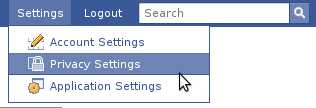
Click on Settings, then select “Privacy Settings” from the drop down menu.
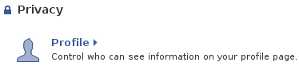
Then click “Profile”.
Scroll down to “Friends” and choose who can see your friends. If you don’t want a certain person to see your friends then select “Customize” and type in the name in the “Except These People” section.

Just one more step then we should be done. You still need to exclude people who use the search to see your friends list. Go to the Search Privacy page and make sure to un-check “Friends List” in the Search Result Content.
Thank you.
I already did that but they still see my friends list… I want to hide all my friend lists from everyone I mean everybody.
I want to hide all my friend lists from everyone I mean everybody. Can you tell me how to do this on facebook?
Go to settings
Go to privacy
At the top of the page you have the options that says
Profile
Search
News Feed wall
Aplications
Click on “Search”
And there you have all the options to choose who is able to search for you, see you profile pic, and your friends list
Saminah: Did you bother to try it yourself before offering the “solution”?
This no longer seems to work. The option to hide ‘friends’ has now disappeared, and my friends list is visible to all again.
This doesn’t work anymore after they changed FB this last time.
Try this. Facebook fixed it in May 2010:
Go to:
– Account
– Privacy Settings
– Friends, tabs and connections
For ‘Friends’ you have three choices: Everyone, Friends of Friends, Friends or Custom
To hide all your friends select “custom” and then in “Make this visible to” “These People” select “Only me”
I found it.Go to “Account”( TOP RIGHT) then to “Privacy Settings” then at the top it says “Basic Directory Information”. At the very end of that sentence in tiny letters it says, ( In blue letters) “VIEW SETTINGS”. It takes you to the next page. The 4th thing down is “See my friend list”. That is the setting for who can see your list of friends..
how do i delete people from my friends list? I’m not so computer savvy obviously because somehow a weirdo I blocked is now listed in my friends list. Don’t ask cuz i don’t know. Help!!!??
maliciouskitty
just go to the friend’s profile then at the end of the profile
there is a “remove from friend list” button click on it
and you can block them too 😉
Thanks Wally!!!
i want to join in face book.
Sorry but you’re all wrong…lol. You have to:
1. Click on “Account” in top right hand corner of your profile page
2. Click “Privacy”
3. “Connecting on Facebook” will be the first option at the very top of the page, then you will click on “view settings” in blue print on the second line underneath connecting on facebook
4. The 4th option will be ” see your friends list”.
– Click on box to the right
– Click on “Custom”
– Click on “only me”
– Click on “Save setting”
THANKS WALLY – your method is VALID thank you loads…
this is bull crap
Thank you for your help. I am sure I will be calling on you some other time.
thnx…it really helps me…………to hide mah friend list…..
Found it! Found it! Got the answer guys! ok…
(1) go to “Privacy Settings”
(2) on top left of page is a little rectangular box image with
“Connection on Facebook”, then it says “View Settings”.
Click “View Settings” and it will give you many options.
So happy I found it again. Nothing worse than idiots stalking you through friends!!
Click ACCOUNT> PRIVACY PREFERENCES> CONNECTING ON FACEBOOK> click on VIEW SETTINGS> scroll down to SEE YOUR FRIENDS LIST
and customize or select from a pre-defined settings.
All those are not working now… If you click ACCOUNT you will see > general,security,notification, aps,mobile, payments, facebook ads. And if you click PRIVACY SETTING you will see > Control Privacy When You Post, Control Your Default Privacy, How You Connect, How Tags Work, Apps and Websites, Limit the Audience for Past Posts, locked People and Apps.
I’m still trying to figure out what to do to hide my friends list, if you have the most updated idea, pls let me know by sharing it here,thanks.
1)go to top right corner
2)go to profile page
3) then hit edit profile
4)go to left corner pick friends & family
5)go to bottom page on right u should see picks & a arrow click the arrow pick” only me” option
6)click save changes on left side!
this should block friends list!
i hope this helped cuz i tried it the other way too No Bueno!!!
Okay, now you go to your profile, click on your friends list and there’s an edit button on the right side of the page and that’s how on the new timeline you hide your friends list.
i want to hide my friend list but no option of edit in profile and view in privacy setting so tell me how to hide friend list……….
sorry but none of the above instructions work..I knew how to do it with the old verison of fb. The new verison this doesnt work..Click on friends list there is no edit button(nomame)..Sinsin urr instructions do not work either..can someone help..this is crazy…thanks.
click on your name (top right hand side to go to your profile). click on the word friends (in blue – this takes you to your friends list). on the right hand side (right below your name) you will see a tab with the picture of a pen/pencil that says “edit”. a little pop-up window appears that says “who can see your friends”. right below that, you will see a little blue arrow. click on the arrow and it gives you choices. click on one of those choices and presto! if you choose the option “only you” then only you can see your friends list. it works now because i just did it. but who knows? facebook may change things again.
minnibons::::Ur solutions works…Thanks
No go to privacy setting. Use activity log. On left choose more on the bottom. Then choose friends. Friends list controls are in your face. Hide them peace
is there any way to hide certain friends on friends list, but still show all other friends to the public????
your frauds
Una vez lista, debemos dejar reposar la masa en un recipiente cubierto
con un harapo un poco húmedo, lo que asistirá a que la fermentación sea la conveniente.