“How do I delete a Facebook game that I don’t play anymore?”
Log into your Facebook account.
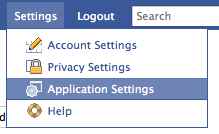
Go to the right hand side of the page near the Search bar, hover your mouse over “Settings” and select “Application Settings” from the drop down menu.
Now you should see a list of Applications and Games which can be categorized by Recently Used, Bookmarked, Added to Profile, and more.
Find the Facebook game you want to remove and click the “X”.

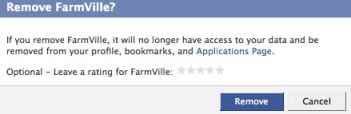
One final step to remove the Facebook application.
If i feel regret after deleting the game(restaurant city), how can i re-install the game , plz help me, thx
thank u very much !!!!!!!!!!!!!!!! 🙂
HOW DO I DELETE ALL GAMES ,ONLY, UNDER APPS AND GAMES?I DON’T EVEN KNOW WHERE OR HOW THEY GOT THERE…THANKS
l have tried to delete Zynga games MANY time & they will not stay deleted.
l have tried to delete Zynga many times & they will not stay deleted. l have done many things as was told to do & they are still there. l donot want them in my gift box but don’t know how to get rid of them. l have written to the games themselves & no answer. Please give me a simple way to delete them. Thankyou
Before the stupid timeline you could go to a place that listed all the games and apps. you could click in a box that checked all of them and then delete. now you have to sit there and delete everyone of them one by one. why change something that was so easy before and took no time at all. Im thinking of deleting my facebook all together. since timeline it hate it.